


Halloween is officially upon us, and if you’re anything like us, your 3D printer is currently running all the time, pumping out pumpkin tea-light holders, articulated skeletons, and costume accessories. It’s easily one of the best times of the year to be a maker. To help you make the most of the spooky season, we’ve put together a round of special Halloween offers on PLA and PETG Ultraglow and built a fun new web tool that lets you transform literally any 3D model into a ghost.

If you like the models shown throughout this article, you can find them all in our Halloween 2026 collection. Many thanks to all the designers from the Printables community. We printed all of them using the Prusa CORE One+ INDX, but most of them can actually be printed from separate parts and assembled. So don’t worry if you don’t have a multitool printer at home.

Ghost Studio web app
Our colleague Kryštof Kohout prepared another simple free web app for adjusting existing models, similar to the ColorMix Shading app we introduced previously.

Using the Ghost Studio, you can turn any model into its ghost version by simply throwing a virtual sheet over it!
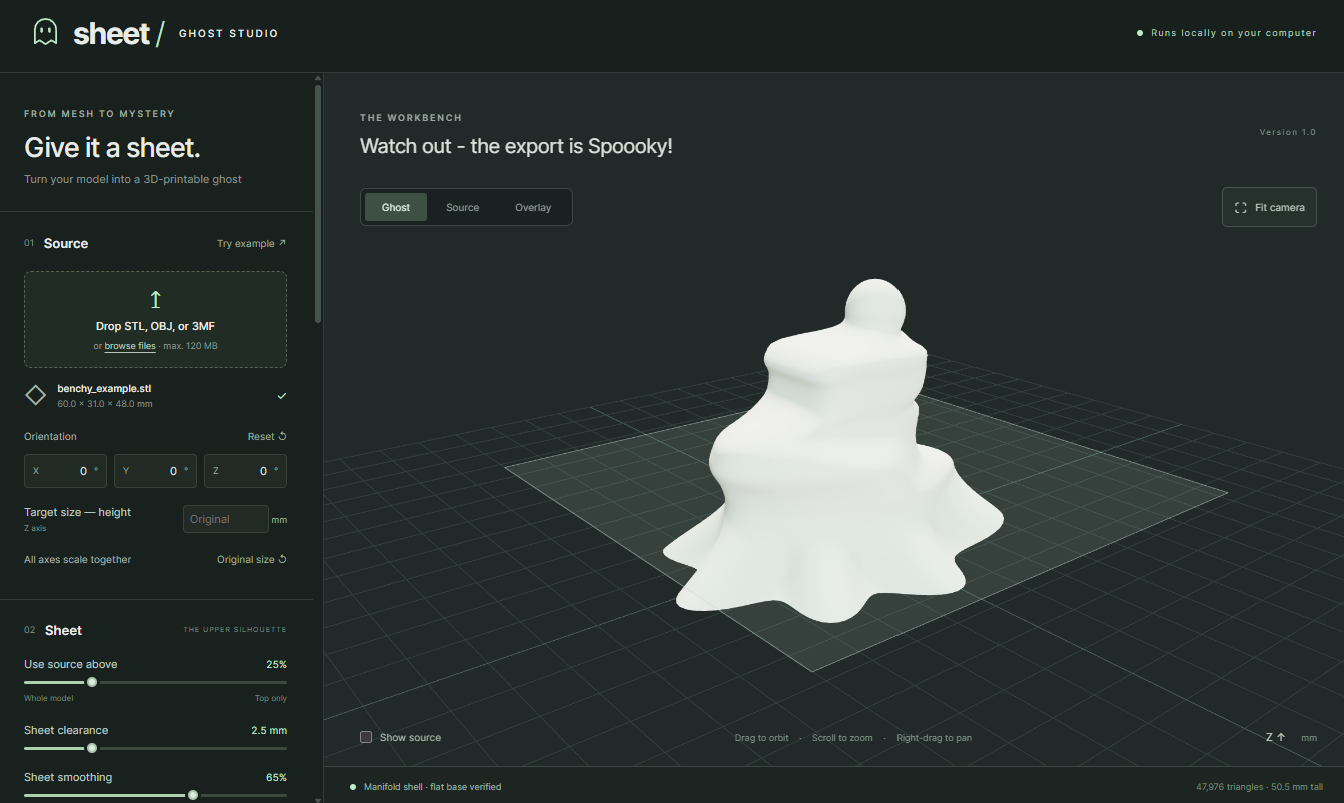
Usage is fairly straightforward: import an STL/3MF/OBJ file of your choice, and the app automatically generates a ghost version based on its geometry. The app loads a 3D Benchy by default, so you can try it out even without your model.
Generally, a viable model should have a distinct shape in the top half and a relatively small footprint so the draping sheet looks natural.

The most important setting is the “Use source above” slider in the Sheet section. This defines the height above which the sheet closely follows the object’s shape. Below the line, it hangs down with procedurally generated folds, which can also be adjusted using the various sliders in the Sheet and Skirt sections.

You can also place eyes into the model by simply clicking on the surface. Just make sure to first enable Add see-through eyes.

Finally, you can export the model. You can either download the STL to your device, open it automatically in PrusaSlicer, or send it directly to EasyPrint. This is the quickest way to start printing on your Prusa machine, and it works even from a mobile device!

One warning, though! The export is EXTREMELY spooOOoky! (Click “Disable spooky sounds” at the bottom of the settings if you’re afraid and alone in the dark.)

Halloween Deals

Bundle 1: Prusament PLA 5+1 FREE pack
Perhaps you already know our 5+1 free filament bundles; we offer them in different colors and different materials. This October, we prepared one specifically for Halloween. For the price of five PLA spools, you get the following colors: “Grave” Galaxy Black, “Ghost” Pristine White, “Poison” Pro Green, “Bloody” Blood Red, “Pumpkin” Orange, and Prusament Woodfill “Haunted” Linden Light. All the PLA models you see in the photos were printed using these six filaments.
Get the Halloween PLA 5+1 FREE bundle

Bundle 2: Prusament PETG Ultraglow Green + Prusa Nozzle ObXidian – 0.6 mm
The PETG Ultraglow has been around for a while, but this is definitely the best time to use it. It’s the brightest glow-in-the-dark filament on the market and glows all night long. The particles that make it luminous also make it abrasive. We recommend using a 0.6 mm hardened non-high-flow nozzle for the best printing results. To make it easy for you to start printing this super spooky filament, our Halloween offer includes the green filament spool and the Prusa Nozzle ObXidian – 0.6 mm with a 15% discount for 108.71 EUR/119.83 USD.
Get the PETG Ultraglow Green and hardened nozzle bundle

Tips, Tricks, and Treats
To get the best out of the PETG Ultraglow, charge it in direct sunlight or using a UV lamp. The material is a bit trickier than ordinary PETG, so check out this Help article to learn more about it.

As mentioned in the beginning, all the featured models are from the Printables community. Halloween is a popular topic, so you can find many, many more models among the results of our previous Printables contests or just by searching.

However, not all of them might be easily printable. It’s hard to give a rule-of-thumb recommendation for any model out there, so here are just a few tips. All these skeletons and teeth often have tiny details that you should pay attention to.
- Always check the guidelines of the model’s author, if they’re present – and follow them.
- Use the G-code preview in PrusaSlicer to check for overhangs and steep angles. Switch on support where necessary.
- Inspect the model in PrusaSlicer a check for too-thin walls and fine details – these could ruin your print.

Some of the models take advantage of the ColorMix feature to create grey from black and white or add shading. On a multi-tool printer, this is an easy option to add more colors.

Last but not least, do NOT use real candles but get some battery-powered alternative. Using LED tea lights or fairy lights is completely safe. The heat and fire of a normal candle inside a 3D-printed model is a very bad idea.

Finally, get ready for this year’s Halloween Printables contest. It will start on October 16, and this time it’s a little special. You can improve your designing skills now with our latest Prusa Academy course – Beginners’ Guide to Blender for 3D Printing: Edit and Remix STLs.
Our Halloween 2026 offers run from October 7 through October 31.
Spooky printing!

Gotta love my timing… Last week I picked up a roll of UltraGlow at PrintedSolid, before this discount… Granted, I don't need the hardened nozzle (I have Spool3D Tungsten Carbide nozzles using Nextruder adapters and copper heaterblocks from Levendigs), so I don't know if the sale really would have saved me anything…
The first thing I printed was OddPlacticity's trio of ghost cats (Here is my make: https://www.printables.com/make/3652617 ), and love the effect. (In hind sight, I should have dried the UltraGlow. I did for a later print of another of OddPlacticity's ghost cats and got a cleaner print than this one, see this make: https://www.printables.com/make/3654281 )
Something that I've noticed about UltraGlow is just how glowy it is. Just sitting on a shelf in a sun-lit room, they have a slight green color to them from the ambient sunlight. This is a glow-in-the-dark filament like no other.
Are there plans to expand the UltraGlow line to include other glowing colors? Blue is the obvious next color, but there are other colors that strontium aluminate can generate (though at lower intensities) like Red, Yellow, Orange, etc… (I'm not sure if green is available.)
The ghost studio looks amazing, thank you.
What model did you use for the ghost cat that's in the first picture?
Great article! The Ghost Studio web app sounds like a fun way to turn ordinary 3D models into spooky Halloween decorations. I especially like the idea of combining glow-in-the-dark filament with creative designs to make Halloween projects more exciting. For creators looking to add another fun element to their Halloween content, **OnlineSoundboard** (https://onlinesoundboard.com/) is a useful resource for finding spooky sound effects, scary sounds, and Halloween audio for videos and creative projects. Looking forward to seeing what the community creates this Halloween!