


In May, we released the Prusa ColorMix, our open-source color mixing model, based on the community project Full Spectrum. We promised you then that we’re working on a dedicated filament bundle.
So we spent the summer developing and testing, and here are the results: new translucent Prusament PLA with five colors for mixing, two spools for adding glitter, and three new PLA colors as a vivid alternative!
A little recap
The ColorMix comes as a feature in EasyPrint and PrusaSlicer. Using any multi-color printer, it allows you to create additional color tones from the loaded filaments. It works similarly to inkjet 2D printing. There, thanks to a method called Halftoning, all colors are printed from just Cyan, Magenta, Yellow, and Black (CMYK) ink in a varying pattern of dots.

In 3D printing, we alternate the colors by layers. For example, a 50% cyan, 50% yellow combination creates green when viewed from a normal viewing distance. The starting combination is CMYW, where W stands for white, providing enough options when printing on a 4T multi-material printer. We need white because we print in the air, instead of on paper.

Perpetual Calendar by CalebTimoteo printed in shades of blue and green (Prusament ColorMix Cyan, Blue, and Gold Glitter).
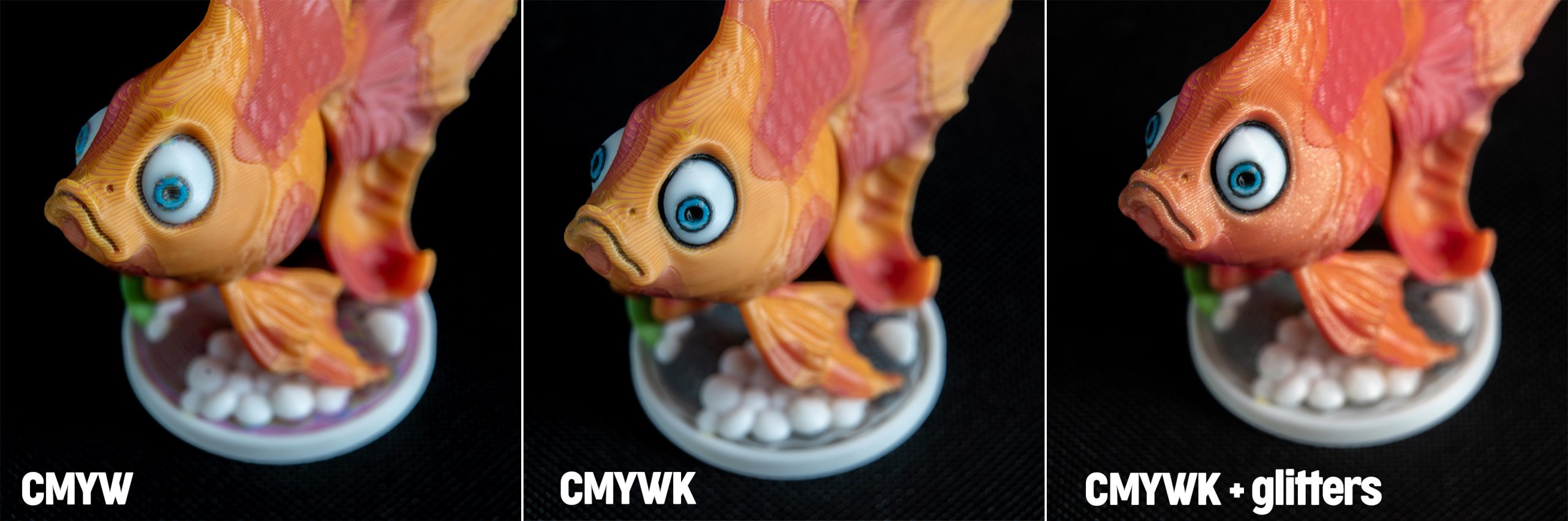
Black can be mixed from an equal ratio of cyan, magenta, and yellow. But due to the nature of the method, it’s blueish grey, rather than truly black. The Prusa XL+ Five-head and the MMU3 unlock the option of adding black filament and mixing the CMYWK color palette, which results in 45 shades. The CORE family printers equipped with the Bondtech INDX upgrade add the possibility to have three extra colors.

Prusament ColorMix Goldfish mixed using four, five, and seven filaments.
What is out there
One of our favorite features of the ColorMix is that it isn’t actually dependent on the filaments. The software model is calibrated against actual prints. We store this data in the OpenPrintTag Material Database, so we can reliably predict the result of mixing any Prusament PLA colors.
The advantage of using the CMYWK colors lies in their convenient coverage of the color spectrum. Also, because the color model is similar to painting with water-based colors, it is quite easy for a layman to imagine the mixing outputs.

Baby dragon by Vlado Turek, printed using the PLA ColorMix bundle.
While bringing the ColorMix to the Prusaverse, we tested most of the CMYW and CMYWK filament sets available on the market. The majority of them are opaque and have saturated colors. The printed models then have nicely bright colors. However, on surfaces that are not completely vertical, we see a strong stripy pattern of the alternating layers.

Sea animals by Real_Prints printed using the most saturated CMYK bundle combined with Prusament PLA Jet Black and the PLA ColorMix for comparison.
There are very few translucent CMYW(K) options on the market, and they provide much smoother blending of the colors, especially of the cyan, magenta, and yellow tones. But we struggled to find a proper white and black for mixing.

Prusament Mushrooms and ColorMix Calibration Cones showing the comparison of other translucent CMYWK bundle and PLA ColorMix.
To blend or not to blend
Based on this testing, we decided to develop our own ColorMix set, one that is semi-translucent and includes shades of black and white that are great for the mixing, as this is a gap in the market. We wanted to keep the colors bright and minimize the stripiness at the same time.

ColorMix Rainbow bookend by Barbora Maršíková and ColorMix Rainbow Planter by Noodlecraft.
Translucent filaments blend well together, and when used in a 1:1 ratio of two colors, it is really hard to tell that this is a ColorMix print, even from a close look. We get a proper green, orange, and violet.

See the comparison of the opacity of different filament brands on the mushroom caps.
As a side effect, the translucency solves the problem of the horizontal surfaces pretty well. On the test model, we see that even the flat top and bottom layers look like the mixed color.

These test prints have surfaces printed parallel, perpendicular, and at a 45° angle to the print sheet. See that there is very little color variation between them.
Getting a nice mix out of the CMY set is quite easy. The tricky part was finding the right opacity for the black and white filament. The ColorMix results are always towards the darker side when mixing two colors, so they are quickly overpowered by black. Opaque white makes the mixes pastel-like, rather than just lighter color shades. We played around with the pigments and found a set we named PLA ColorMix, including Cyan, Magenta, Yellow, Black and White filaments with just the right relative opacity for perfect mixing. Other brands usually have just a grey filament to complete the bundle, but that doesn’t work very well for any kind of shading.

Book Page Holder by fifindr. The model has two parts, both printed using the same two filaments but with different ColorMix ratios.
Funnily, when we found the optimal translucent match, we started to miss the bright colors. That’s why we decided to keep the saturated cyan, magenta, and yellow filaments with which we started the testing, and we also added them to the PLA portfolio under the name PLA CMYK. You can choose between the brightness and the blending, depending on the outcome you need to achieve or your model’s geometry. The CMYK filament hides any infill structure that might be visible through the ColorMix ones. As the fourth filament, the CMYK set uses Prusament PLA Pristine White. The ColorMix White has a too light saturation for them.

See the comparison of mixing Cyan and Magenta on the Goldfish model.
As mentioned above, our ColorMix filaments are semi-translucent. This property allows light to pass through thin layers, causing colors to stack optically rather than block each other out. At the same time, they do block light when printed in larger volume. Their translucency is nicely visible when printing a model in vase mode.

The translucent properties are shown on the Spiral Vase Rose by lytta. On the right side, see a comparison of Prusament PLA Jet Black and Prusament PLA ColorMix Black.
A touch of glitter
With three more filament slots on the CORE One+ INDX, we wondered what else might be worth adding. Because of the popularity of our Galaxy PLAs, we decided to offer a bit of glitter for every color.

Water dragon shaded using the ColorMix Shading. The base color is PLA Emerald Green, and the shading is done using ColorMix Gold Glitter and Silver Glitter.
It comes in the form of ColorMix Gold Glitter and Silver Glitter. Both are based on PLA Natural, so they don’t influence the color tones. You can use them together with the ColorMix CMYWK colors. Besides the glitter, they add a lot of shades on the black & white scale.

The ColorMix Calibration Cones showing all possible greyscale combinations.

Low Poly Mountain by Prints. Different mixes of White, Gold Glitter, and Silver Glitter allow lively shading on the snowy mountain tops. A 1:1 mix of both glitters turns a river into an iceberg.
But more than that, you can turn any PLA print into a “Galaxy” one. By simply using a 1:1 mix of any PLA with one of the glitters, you get a sparkling look. This works best with dark colors: Blood Red, Emerald Green, Royal Blue, or Anthracite Grey are good examples. The ColorMix glitter doesn’t decrease the intensity of these colors.

The Galaxy effect is shown in the Cute Stylized Dinosaur Toy by BMoArtist. The base filaments are PLA Emerald Green, PLA Lipsick Red, and PLA Royal Blue. The supports are printed using the pure glitter, and the mixing ratio is 1:1.
You can even mix the glitters with PLA Woodfill, which can be interesting for printing home decor. By using two different ratios of the filaments, you subtly increase the contrast between the surfaces.

Prusament Woodfill Pastel Brown mixed with ColorMix Gold Glitter on the Spiral Plant Pot.
Colors and pricing
Right now we are launching the translucent PLA ColorMix in the five basic colors: Cyan, Magenta, Yellow, White, and Black, and the accent pair of glitter, Gold and Silver. You can get 1 kg for 32.99 USD / 32.99 EUR (VAT incl.).
Because they make the most sense when used together, you can also get a PLA ColorMix bundle of all seven filaments for 209.99 USD / 180.49 EUR (VAT incl.).

In addition to that, we add the PLA CMYK filaments, the opaque version of Cyan, Magenta, and Yellow. The come together in a PLA CMYK bundle of four spools, including Prusament PLA Pristine White, which is a great combination for 4-toolhead printers. When adding black, we recommend the ColorMix Black. The price of 1 kg is the same and the bundle is available for 143.99 USD / 123.99 EUR (VAT incl.).

To help you imagine how many color combinations you get from the available filaments, we prepared an overview table:

Where ColorMix stands out
As a 3D printing technique, this is quite impressive, but there aren’t many prepared models yet. Let’s have a look at some possible applications.

Suspended Bento Solar System by okuyuki.
It’s not only about adding more colors, the advantage is that you create shades of similar colors. Thanks to that, the ColorMix prints look less like cheap toys. Often you don’t need five or eight different colors for a model but you need to highlight its structure or distinguish its features.

Plant and Animal Cell Models by Plant X Tech.
We find it a great option for all sorts of educational models. They need to be colored to be descriptive, like the cells above.

Anatomic Heart by Malte.
But don’t forget that it works for any filament, whether you need to print flame imitation, engine parts for miniatures, or a nature scene, it will always look more natural when you use the method for shading. And ideally, such models should look similar to the real thing. Going beyond the new filament bundles, we can show this on the anatomic model of the heart, where a mix of PLA Blood Red and PLA Vanilla White was used to separate the atria and ventricles.

Sea animals – set by Real_Prints printed together using the Prusa CORE One+ INDX and the CMYWK filament combination (supports removed for the photo).
The ColorMix bundle allows you to use a large color palette without the need to own a large filament library. This is very convenient for printing toys, gifts, or decoration pieces.
Combining the black and white filaments with both glitters creates about 20 shades on the grayscale. This presents an opportunity to make sculptures and architecture models look more realistic or print stylish black and white photos.

The grayscale shading is also perfect for life-like models of many animals, like this ColorMix Tabby Cat (Cmykočka) by Vladimír Kafka. The larger one is life-sized, printed in full volume of the Prusa C1L+ INDX.
Tips and tricks
There are a few rules to adhere to. Firstly, use a layer height of a maximum of 0.15 mm. This provides very good results, as you see in the pictures throughout this article. For a perfect outcome, 0.1mm layer height would be even better but it adds a lot of printing time and usually it’s not necessary.

Stephanie’s Knotted Vase by StephanieS.
The recommended infill type is gyroid with 5-10% density, depending on the model’s geometry. Because of the translucency, the infill might sometimes be visible, and this way the structure is uniform. Don’t forget that the best result is achieved on surfaces printed vertically.
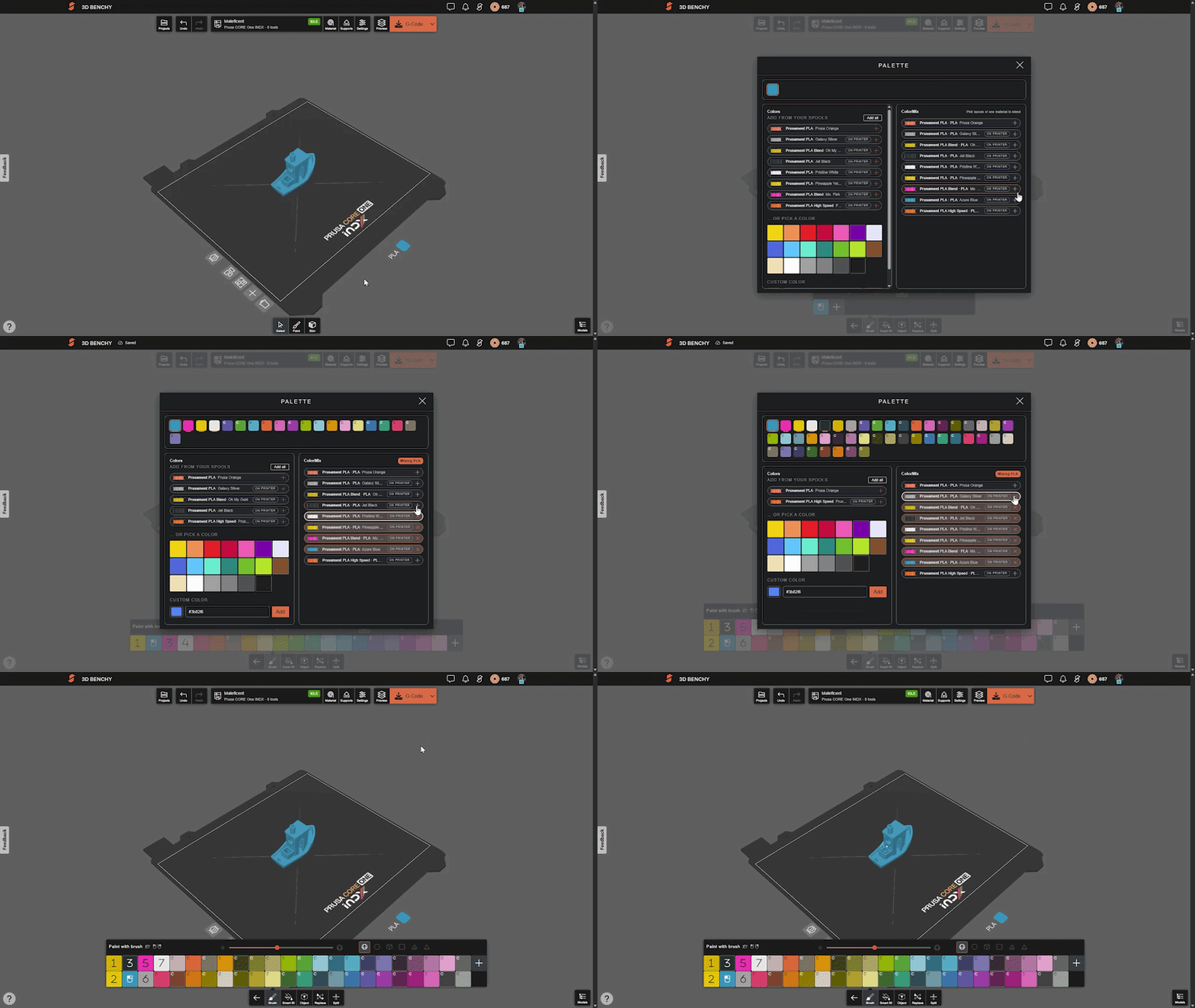
One important remark: we’d like to set a convention for the order of the filaments to make it easy to share and print each other’s models. All the models designed for the ColorMix filament that we share have them loaded in the following order: Cyan, Magenta, Yellow, White, Black, Gold, and Silver. The order is the same whether the printer has four, five or eight tools. You can set this in PrusaSlicer and save it as a preset.

It doesn’t end here
With the software color model for the mixing, the implementation in EasyPrint and PrusaSlicer, and the filament bundles ColorMix and CMYK, we now have all the tools ready for your smooth colorful printing experience.

The ColorMix memes by Kryštof Kohout were created using the ColorMix Image mapper app.
We keep wondering about more and other ways to use the technique. One possibility is automated mapping of colors to 3D printing models, like this ColorMix Image mapper by our colleague Kryštof Kohout or the Color Mix Lab by Printables user MichaelQ.

Nefertiti ColorMix – created with Color Mix Lab by MichaelQ.
It’s worth mentioning that new apps are now appearing faster than before, and there are all sorts of methods of automated coloring. An interesting option is the Gradient Chef by Printables user BreitIdeasInc.

Prusament Sci–Fi Vase and low-poly bunny from PrusaSlicer Shape Gallery colored using the Gradient Chef app.
Mixing four colors together would be technically possible but the results simply don’t look good. It’s like putting the brush in all the watercolors, eventually all you get is a muddy brown. But how about mixing different materials? For PETG, PC blend, and TPU this works very well, we’re just not yet sure what it is good for.

ColorMix Calibration Cones mixing Prusament PETG Chalky Blue, Prusament PC Blend Carbon Fiber Black, and Prusament TPU 95A Lipstick Red.
We’d like to encourage you to design, paint, and share your ColorMix creations on Printables.com and use the tag “colormix” to make them easy to find. We’re looking forward to seeing your ideas.
Happy printing!

I do not have any plans for INDX just yet – but fun article as always. Must be said – but I appreciate the quality of photos shown here.
It would be great to get a bundle with sample size spools 200g/300g, maybe without the glitters to get it down to the standard sample pack size of 5.
Waiting for the PETG version. Also, would it be possible to extrude more or less of each color, thus making different shades and significantly increasing the number of colors? My thought is to make the total of all colors constant and play with the ratios so that the total layers stay the same.
If you are implying different thicknesses for example, that technically could be possible down the line and looked into, but not at the moment. Good and creative idea!
Why not add a third perimeter at the inside in opaque white so the light is reflected through the translucent perimeters twice, resulting in a more intense, less translucent color?
Please offer a ColorMix bundle of CMYKW without the two glittery ones. Thanks.
I'm curious to know how these compare to Polymakers Panachroma set.
Hey! So one of the pictures actually is exactly that material. The first picture of the mushrooms with cones
Very impressiv. What's the plan for PETG ColorMix?
Now that you own PrintedSolid and given that David Randolf had put a lot of time and research into their color lithophane CMYW bundle (https://www.printedsolid.com/products/jessie-premium-pla-color-lithophane-bundle), have you in Prague or your team members in Delaware evaluated the Jessie color lithophane bundle for use in color mix?
Would it be possible to have the colour codes mentioned on the website with the filements?
It can sometimes be hard to select the correct colour in the slicer.
If Hue, Sat, Lum, Red, Green, and Blue numbers would be available on the website with the filament colours it could give a more precise preview of the mixed colours/virtual extruders.
Or colour code in HEX and make HEX possible in the slicer.
Bonjour,
Cet excellent système fonctionne t'il avec le MMU3 sur la MK4S sans problème particulier ?
With all the work done why are the Prusament PLA ColorMix Filaments not available in the easyPrint Filament database?
Mixed PC/TPU ? increase impact resistance maybe
Will you be adding rgb color mix versions? The glitter is good and all, but I'd rather have cmykwrgb for the best color range.