


We’ve got one more product released in the past few months that still deserves a proper introduction: let’s talk CORE One+! It’s the next stage in the CORE One’s evolution that features a handful of tweaks for even smoother workflow. We’ll walk you through its new features, show you how to upgrade your CORE One to it for free, and explain how INDX fits into the picture.
What Happened to the CORE One?
When we introduced the CORE One in 2024, we knew we would continue improving it over time. Just like we did with our popular MK-series. A year later, this effort has taken its final form: the CORE One+! In the usual Prusa way, you can easily level up your original CORE One to the plus version. Just print all the necessary parts from Printables or buy our official upgrade kit for a few dollars. We’ll talk more about the upgrade below.

There’s no need to boost your CORE One if you don’t want to, though. It will keep cracking out perfect prints and receive our support in the years to come. Its core features remain unchanged. So does the compatibility with a wide range of expansions including the upcoming multi-material upgrade INDX from Bondtech.
CORE One+ New Features
But now, let’s go back to what’s new with the CORE One+! It includes all software updates we released for the CORE One since its launch. This means even better print quality with nerfed VFAs and smoother operation right out of the box.
We also leveled it up with hardware quality-of-life improvements we created for the CORE One L. That’s our favorite way to do things. Whenever we develop a neat feature for a new printer, we immediately think about how other models could benefit from it. And they do! Here are the enhancements the “plus” got from its bigger sibling:
- Automatic Top Vent Operation: The Nextruder now automatically opens the vent for low-temp materials (PLA/PETG) and closes it for high-temp ones (ABS, PCCF…), ensuring the optimal thermal environment for every filament. The best part? It does it all for you so you don’t have to check the vent before each print.
- Easy Flex Loading: Pushing Flex through a PTFE tube can be… tricky. Thanks to the redesigned filament insertion point with a manual switch, you’ll load in flexible materials quickly without the usual hassle.
- Redesigned Spoolholder: A modular, bayonet-style spoolholder that you can easily swap for a wider version to accommodate 2 kg Prusament spools. You can even use it to mount our new drybox.
This combo of fine-tuned firmware and hardware tweaks gets you the best print quality while making the entire workflow even smoother and more efficient.

Upgrade Time!
Do these improvements make you want to upgrade your CORE One right away? Perfect. You have two options. You can either print all the parts yourself – they are available on Printables for free – and reuse the magnets and screws you already have from your CORE One. Option two is buying the upgrade kit from our e-shop.
Parts You Can Upgrade
- Nextruder & top panel: a new Nextruder cover with an extended arm and a vent block for the automatic grille opening.
- Side filament sensor: a whole new body, cover, lever, and a switch to replace the entire original sensor, reusing its non-printed parts.
- Spoolholder: composed of the universal puck, the spoolholder body and a rubber O-ring.
If you get the official upgrade kit from our e-shop, all the parts arrive at your doorstep. You just unpack them and follow the Upgrade from CORE One to CORE One+ manual. There is even a “+” sticker for the door to make it obvious your workshop, office, or lab now rocks a CORE One+.
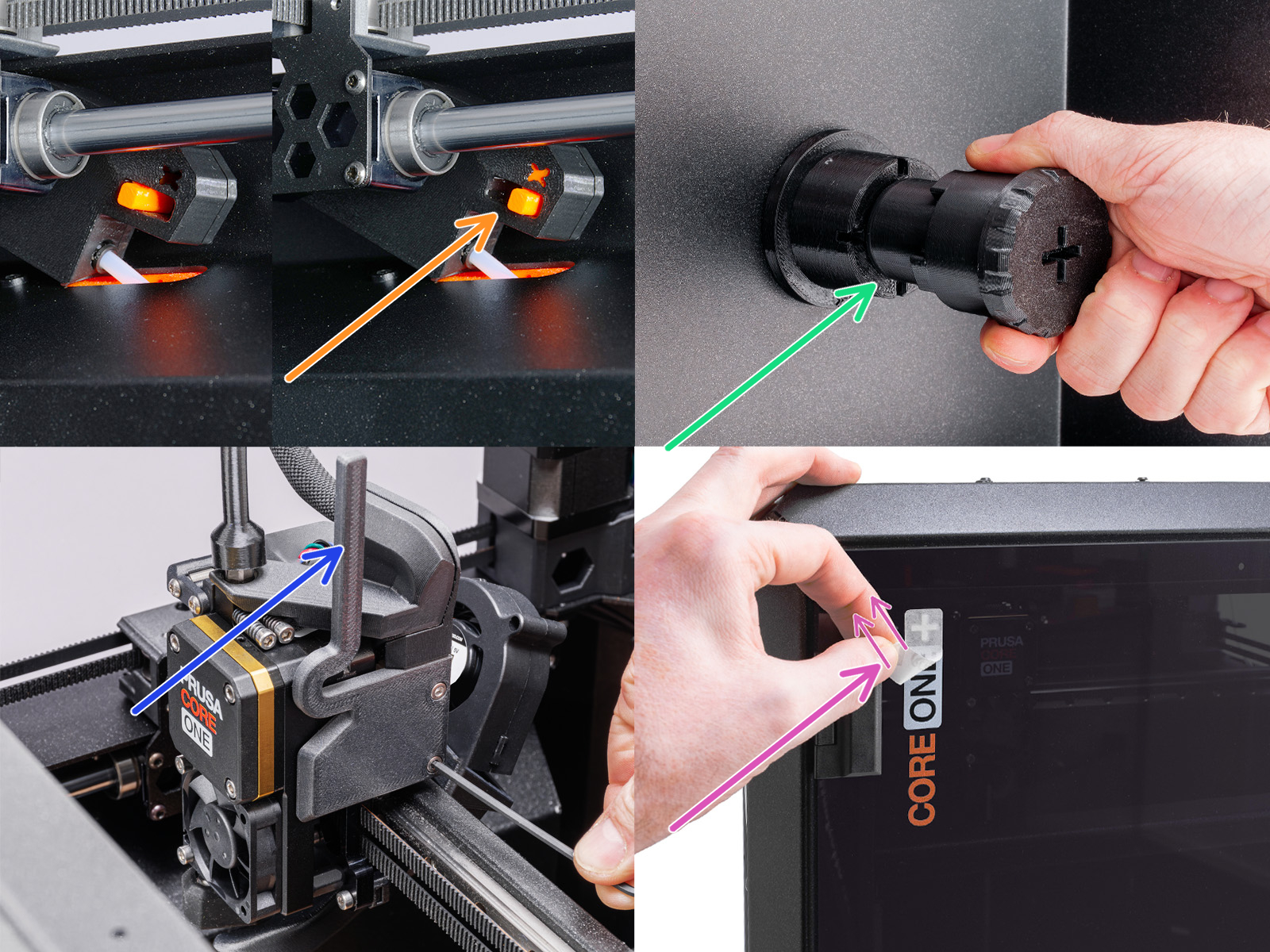
The DIY Upgrade
If you decide to go the maker way, the community version manual is your best buddy. It gives you an overview of everything you will need to do. On our Printables account, you’ll find the parts you need neatly sorted by the assembly they belong to, material, and recommended color.
You can harvest the metal parts, screws, magnets, and a steel ball from the disassembled CORE One parts (i.e., the old filament sensor). The only thing that you need to get is the rubber O-ring for the spoolholder (size 25×3.5 mm). You’ll surely find one in your nearest hardware store, but the community already solved this for you! Among the remixes, you’ll find O-rings ready to be printed using the flexible TPU 95A. By the way, there are also spool holders for 2 kg filament spools and other handy community designs, so definitely check this section if you’re wondering how to top up the upgrade.
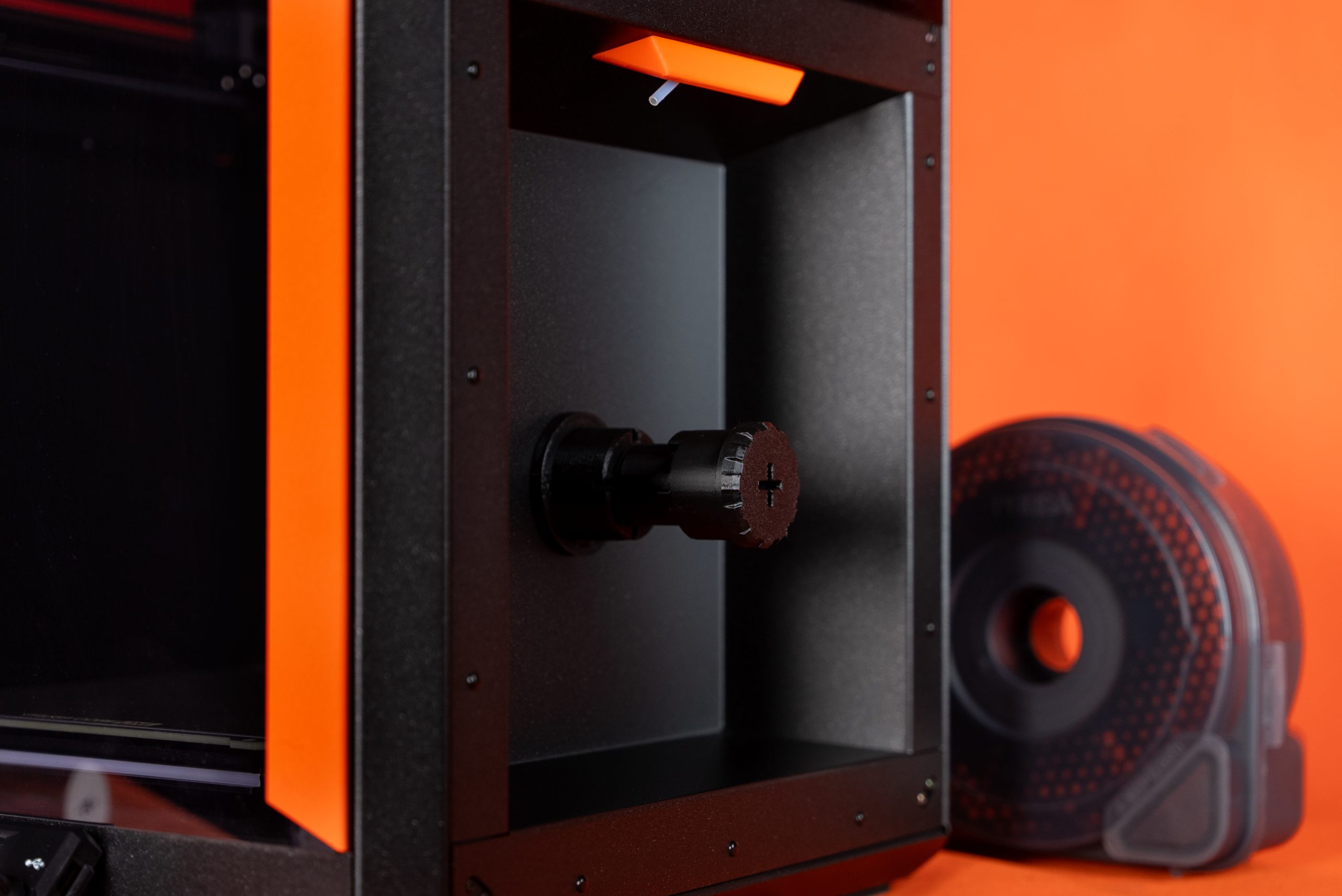
We were able to include a few extra screws in the official upgrade kit, so we made some of the printed components a tad thicker. They fit better to our in-house assembly process this way. On the other hand, the community parts are optimized to reuse as many screws from the original assembly as possible. Apart from this tiny difference, both versions are identical.
The advantage? Once you have all the parts ready, you can also check the detailed manual prepared for you by our colleagues at Prusa Help. This is just in case the community manual gets too, let’s say, adventurous for you.
…and if you feel sad about not having the little “+” on the door, a white marker can come to your rescue.
The upgrade is a perfect intro to 3D printer modding. If you’re a CORE One Kit owner, it will be a piece of cake; you have built your printer from scratch after all. If you went for the Assembled version, this might be the perfect chance to try out some tinkering yourself! It’s nothing to stress about. Our instructions are, as always, super easy to follow even for complete beginners.
Avoiding Confusion
On the Prusa Help page, you’ll see the CORE One and CORE One+ as separate printers. Thanks to this division, we’re able to keep the manuals simple for you without having too many subversions within the same steps. This also means that if you decided not to upgrade your CORE One, e.g. because you want to go directly for the INDX add-on, you can find all the manuals, guides, handbook, and latest firmware of your printer at prusa.io/core-one.
You’ll find the upgrade guidelines, firmware, handbook, and all the other related topics for the “plus” version at prusa.io/core-one-plus. This is why it helps to have the “+” on the door: you’ll always know which machine you’re at.

As you’ve seen, the main difference between the plus and original CORE One lies in the hardware upgrades. Now, let’s briefly talk about software. The PrusaSlicer profiles and G-codes are fully compatible for both printer versions. This means you’ll only find CORE One without the “+” in most places. The same goes for printer firmware, Prusa Connect, PrusaApp, and EasyPrint. No matter whether you upgraded the hardware or not, if you see CORE One or CORE One+, you can use it for either printer.
Firmware Upgrade & Automatic Vent Control
Whether you followed the community guidelines or our official manual, there is one important step: upgrading to the latest firmware (6.4.0). You might be asking why, when we’ve just said they are interchangeable.
Yes, the CORE One and CORE One+ run on the same firmware, but only its latest version has one extra feature that’s key for the upgrade. We’re talking about the Chamber Vent Control. You’ll find it in your printer’s Settings under Hardware. Set it to Auto, and the printer will automatically open and close the grille based on the material loaded.
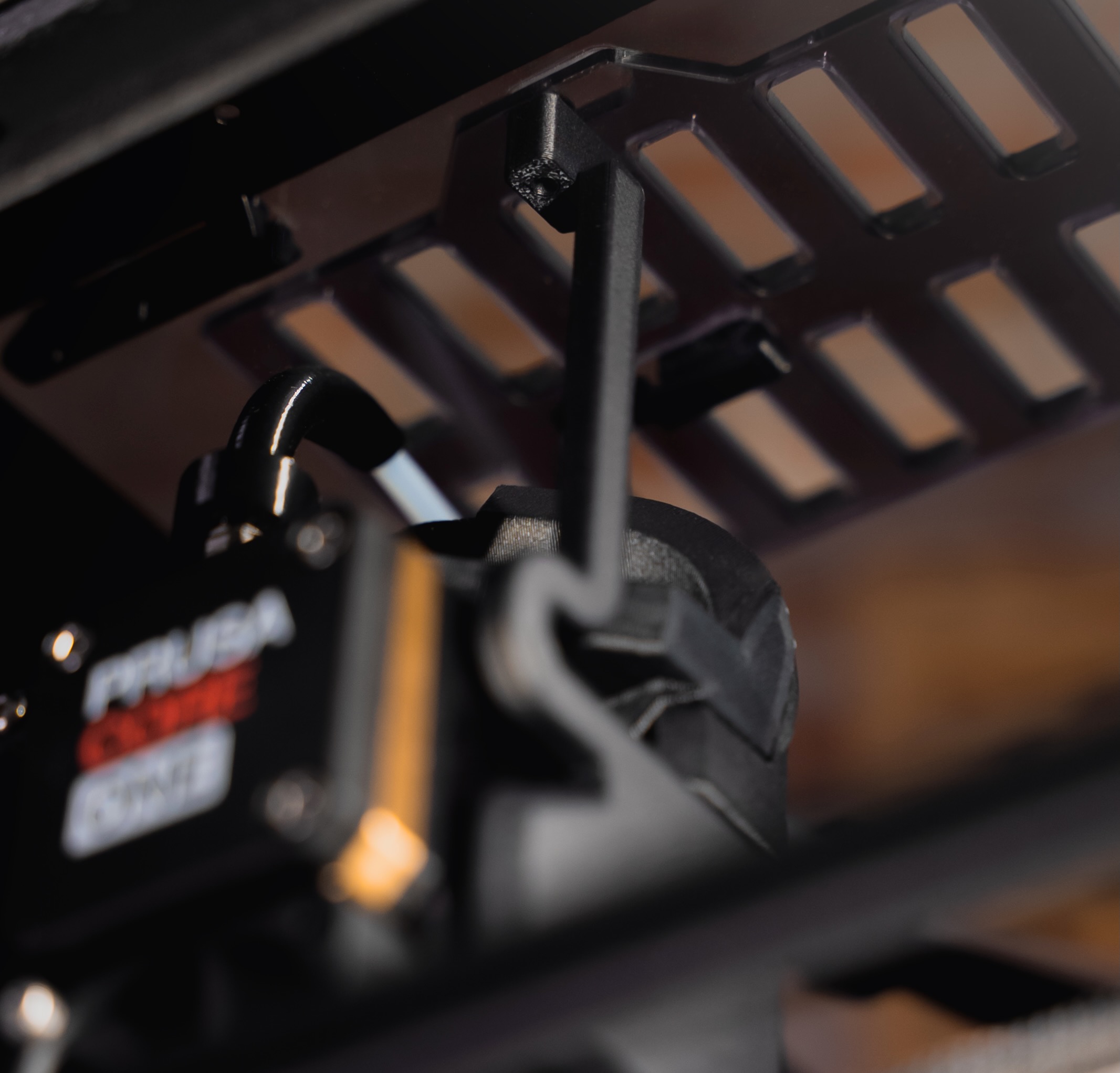
The next option is Manual. This is what you want to select for the CORE One. Like before, the printer asks you to open or close the vents yourself when it starts printing. The last option is switching the function off completely.
How about the INDX Upgrade?
One of the biggest announcements we revealed at Formnext 2025 is the INDX upgrade by Bondtech. This affordable add-on turns your CORE One/+ into a multi-material powerhouse with up to 8 toolheads. You’re probably interested in printer model compatibility. No need to worry. While adding the INDX system, the top lid, spoolholder, and filament feed all get replaced to accommodate the multi-material system. This means you can mount the INDX upgrade on both the CORE One and CORE One+ printers. It’s ready for either machine!
 Upgradable to the Core

“We spent a lot of time making the design future-proof and modular, so we can use it as a base for upgrades for years to come.” Jo wrote this in the CORE One article a year ago. The CORE One+ is a direct result of that approach, showing what true upgradability means in practice. No CORE One component is welded or glued, making it super easy to build upon. You can improve your machine as time flies for a fraction of the latest model’s cost. The build-to-last philosophy ensures your 3D printer is ready to evolve along your projects with new tweaks, modes, and upgrades.
Happy printing!
I realize this post is about the Core One+, but any news on when the Core One L will get INDX support?
Thanks for all the great work !
No specifics have been released yet, but it should most likely be as part of the next wave of INDX releases if everything goes according to plan
When will we be able to buy INDX-based printers without having to buy a printer with a Nextruder only to throw it away as part of the upgrade?
Sounds like INDX will leave you with quite a lot of parts that you'll never use again. Can we expect "One+ with INDX" set to be sold later this year? It kinda makes no sense for me to buy One+ only to partially disassemble it after two months and got left with barely used parts I'll never use again.
Yes, we plan to have a version specifically with INDX bundled with it in the future, though we don't have an exact timeline for it at the moment. It should be later within the year though.
Evening,
Haven't been paying attention to the INDX upgrade since I purchased the core one L.
Before I purchased the core one L I asked the question of is this going to be upgrad able to the INDX system? I was told it would be, so I bought it.
Now it seams according to the answers on this post, it may or may not be?
Why would you try to jam 8 print nozzles into an original core one when the L is larger and a better platform? If this core one L is not upgradeable to the INDX system both my core ones will be my new boat anchors!!
I don't like being mislead, so I hope I am reading these posts wrong?
I've heard Core ONE L will also get the INDX but later
Has there been any ETA, pricing, general hopeful timeframe, or even any info regarding number of heads can fit for Core One L INDX?
Trying to descide if I should go for H2C now or if Core One L INDX is close enough to wait…
From what I've heard from various reputable YouTubers, the C1L is expected to have 10 heads, but no one is talking about timeframes yet. If you don't need the multiple heads now, but still need a printer now, it is expected that the C1L will be upgradeable once INDX is available for it. Yes, you'll have an unused Nextruder after the upgrade, but hopefully you'll have used it and gotten some value out of it while waiting for the upgrade.
https://veneda.es/pvc-profile
La belleza de una ventana está en los detalles, y precisamente ahí es donde Veneda marca la diferencia, cuidando cada acabado y cada elemento con la máxima precisión. En Veneda combinamos tecnología alemana Kommerling y Rehau con un diseño mediterráneo elegante y luminoso, logrando un equilibrio perfecto entre innovación, estética y funcionalidad.
Ofrecemos ventanas de aluminio y PVC que aportan más luz natural, aislamiento y seguridad, creando espacios más confortables, eficientes y protegidos para el día a día.
Nuestros sistemas permiten grandes aperturas panorámicas y una estética moderna perfecta para viviendas nuevas o reformas, adaptándose a diferentes estilos arquitectónicos y potenciando la sensación de amplitud en cada estancia.
The new feature of CORE One+is really great, looking forward to it
Explore the Best Dash Cam Front and Rear for superior safety
Best Dash Cam Front and Rear https://bestdashcamfrontandrear.net/